

Family calendar setup guide for busy parents in 2026
Managing a family schedule can feel overwhelming when everyone has different activities, appointments, and commitments pulling them in multiple directions. Missed soccer practices, overlapping dentist appointments, and forgotten school events create unnecessary stress and conflict. A well-designed family calendar system transforms this chaos into clarity by centralizing schedules, improving communication, and helping you reclaim precious time for what matters most. This guide walks you through a proven step-by-step process to set up a family calendar that actually works for your household, reducing daily friction and creating the work-life balance you deserve.
Table of Contents
- Key takeaways
- Gather your tools and decide on calendar types
- Step-by-step family calendar setup process
- Common challenges and troubleshooting tips
- Benefits you’ll notice with an organized family calendar
- Stay organized with home management systems
- How do I choose the best family calendar app?
Key Takeaways
| Point | Details |
|---|---|
| Color coded calendars | A multi calendar setup uses distinct colors for each member and a shared calendar to prevent conflicts and improve clarity. |
| App choice by devices | Your calendar app should match your family’s devices and privacy needs rather than chasing trendy features. |
| Reduces parental stress | Effective schedule management significantly reduces parental stress and boosts family satisfaction. |
| Privacy mindful sharing | Privacy settings deserve careful attention to protect your family’s information from accidental exposure. |
Gather your tools and decide on calendar types
Successful family calendar implementation starts with choosing the right tools and structure. The recommended setup involves 3-5 color-coded calendars: one shared family calendar for collective events like vacations and family dinners, individual calendars for each child’s activities, and private parent calendars that overlay for conflict checking. This approach gives everyone visibility into family commitments while maintaining personal schedule autonomy.
Color coding transforms calendar management from confusing to intuitive. Assign each family member a distinct color so you can instantly identify whose activity appears on any given day. Dad might be blue, Mom green, your daughter purple, and your son orange, with the shared family calendar in red. This visual system eliminates the need to read every event title when scanning for conflicts.
Your calendar app choice should match your family’s existing technology ecosystem. If everyone uses iPhones, Apple Calendar integrates seamlessly. Android-dominant households benefit from Google Calendar’s cross-platform accessibility. Mixed-device families need apps that work everywhere without friction. Consider these time management tools for parents based on your specific needs.
| App | Best For | Cost | Key Features |
|---|---|---|---|
| Google Calendar | Cross-platform families | Free | Universal access, strong sharing, integrates with Gmail |
| Apple Calendar | iOS households | Free | Native integration, clean interface, iCloud sync |
| Cozi | Family-focused features | Free/Premium | Shopping lists, meal planning, limited free tier |
| PicCal/Calendara | Tech-savvy parents | Paid | AI event extraction from photos, advanced automation |
Pro Tip: Choose a calendar app that matches the devices your family already uses daily rather than forcing everyone to adopt new technology. Friction in access means the calendar won’t get used consistently.
Separate but overlaid calendars reduce scheduling nightmares. When you can see your teenager’s soccer practice overlapping with your work meeting and your partner’s gym time, you spot conflicts before they become problems. This visibility enables proactive coordination rather than reactive crisis management. The preparation you invest now in selecting tools and calendar structure pays dividends through months of smoother family operations.
Implementing these time management tips for families alongside your calendar setup amplifies your organizational success.
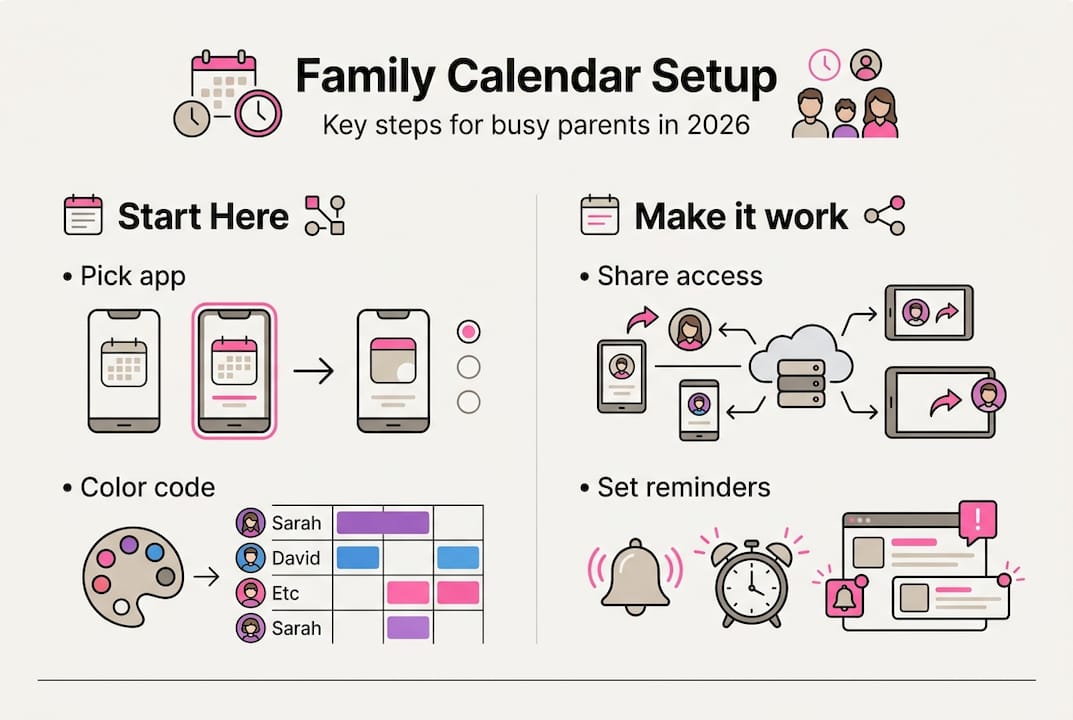
Step-by-step family calendar setup process
With your tools selected and calendar structure planned, follow this systematic process to build your family calendar system. Each step builds on the previous one, creating a comprehensive scheduling solution.
-
Select your calendar application. Download and install your chosen app on all family devices. Create accounts for each family member who will manage their own schedule. Verify everyone can log in successfully before proceeding. Popular options include Google Calendar for cross-platform accessibility, Apple Calendar for iOS families, Cozi for family-specific features, and AI-enhanced apps like PicCal for photo-to-event extraction.
-
Create individual calendars with color assignments. Within your chosen app, create separate calendars for each family member plus one shared family calendar. Assign each calendar a unique, easily distinguishable color. Name calendars clearly: “Dad – Work & Personal,” “Emma – School & Activities,” “Family – Shared Events.” Clear naming prevents confusion when viewing multiple overlaid calendars.
-
Configure the shared family calendar and overlay views. Set up your main family calendar for events involving multiple members: family dinners, vacations, school breaks, and household appointments. Configure your calendar view to display all individual calendars overlaid on the family calendar. This overlay creates the visibility needed to spot scheduling conflicts before they happen.
-
Populate calendars with recurring events and assign management roles. Add all regular commitments first: work schedules, school hours, sports practices, music lessons, and standing appointments. Set these as recurring events to avoid manual entry each week. Designate one parent as the primary calendar manager responsible for adding new events, but empower all family members to update their own calendars. This shared responsibility prevents bottlenecks while maintaining accuracy.
-
Share calendars and configure permissions thoughtfully. Share the family calendar with all household members with appropriate edit or view-only permissions based on age and responsibility level. Share individual calendars selectively, allowing parents to view children’s schedules while maintaining privacy for adult calendars. Review permission settings carefully to prevent accidental sharing outside your family.
Pro Tip: Enable notification features and explore AI event suggestions in your calendar app to reduce manual data entry. Many modern apps can extract event details from emails or photos, saving significant time.
Applying block scheduling for families within your new calendar system helps protect time for priorities that matter most. Consider implementing time blocking techniques to maximize your family’s productivity and ensure important activities don’t get squeezed out by urgent but less meaningful commitments.
Common challenges and troubleshooting tips
Even well-designed family calendars encounter obstacles. Anticipating common issues and knowing how to resolve them keeps your system functional when problems arise.
Privacy concerns top the list of calendar challenges. Collaborative calendar apps create privacy tensions when families need coordination without accidental exposure of sensitive information. Use selective sharing features to control exactly what information each person sees. Create separate calendars for truly private events rather than mixing them with shared family schedules. Never share family calendars with people outside your household without carefully reviewing what events they’ll see.
Syncing issues plague families using multiple devices and platforms. When Dad’s Android phone shows different events than Mom’s iPhone, coordination breaks down. Troubleshoot syncing problems by verifying all devices use the same account credentials, checking internet connectivity, and confirming calendar sync settings are enabled in device settings. Force manual syncs when automatic updates fail. Consider switching to a more reliable cross-platform solution if syncing problems persist.
Managing overlapping events requires proactive strategies:
- Enable conflict alerts in your calendar app to receive warnings when new events overlap existing commitments
- Review the full week ahead during Sunday planning sessions to identify potential conflicts early
- Use calendar overlay views to visualize everyone’s schedule simultaneously
- Build buffer time between back-to-back events to account for travel and transitions
- Establish family policies for prioritizing events when conflicts are unavoidable
Quick fixes for common calendar mishaps include clearing app cache when events disappear, re-sharing calendars when permissions break, checking spam folders for calendar invitations, and restarting devices when sync fails completely.
Protecting your family’s schedule information requires ongoing vigilance. Regularly audit who has access to shared calendars and what events are visible to each person. Privacy breaches happen when we forget to revoke access after circumstances change.
Maintaining work-life balance becomes easier when you can identify and resolve calendar conflicts before they create stress. Implement these time management strategies to complement your calendar system and maximize family success.
Benefits you’ll notice with an organized family calendar
The effort invested in setting up and maintaining a family calendar delivers measurable improvements in daily life. Research documents specific benefits that matter to busy parents struggling with schedule overload.

Scheduling conflicts decrease dramatically when everyone can see the full family picture. 65% of parents report family schedule management as a significant stress source, but effective tools reduce work-family conflict and improve overall well-being. You’ll notice fewer forgotten appointments, reduced last-minute scrambling, and more predictable daily routines.
Key benefits families experience include:
- Improved communication as everyone stays informed about upcoming events and commitments
- Reduced parental stress from knowing schedules are coordinated and conflicts are minimized
- Enhanced work-life balance through better visibility into family time versus work obligations
- More quality family time as coordination becomes efficient rather than consuming
- Greater child independence as older kids manage their own schedules with parental oversight
- Fewer arguments about miscommunication or forgotten activities
Empirical evidence links schedule management tools to lower work-family conflict and better well-being, with research suggesting interventions should particularly target dual-earner parents managing complex schedules. When both parents work demanding jobs while coordinating children’s activities, a shared calendar system becomes essential infrastructure rather than optional convenience.
| Benefit Area | Impact | Research Finding |
|---|---|---|
| Parental stress | Significant reduction | 65% of parents cite scheduling as major stressor |
| Work-family conflict | Measurable decrease | Schedule tools reduce conflict between domains |
| Family satisfaction | Notable improvement | Better coordination increases overall well-being |
| Communication quality | Enhanced clarity | Shared visibility reduces misunderstandings |
The improvements extend beyond logistics into relationship quality. When you spend less energy managing schedules and more energy enjoying family time, everyone benefits. Parents feel more in control. Children develop better time management skills by participating in the system. The household operates more smoothly because everyone knows what to expect.
Understanding why scheduling family time matters helps you prioritize calendar use even when life gets hectic. Explore these family productivity hacks to build on your calendar foundation and create even more efficient household systems.
Stay organized with home management systems
Your new family calendar represents one powerful component of comprehensive home organization. While coordinating schedules reduces stress, integrating your calendar with broader home management systems amplifies results exponentially. Consider how meal planning connects to your calendar by scheduling prep time and family dinners. Link cleaning routines to calendar blocks so household maintenance happens consistently. Coordinate budget reviews with calendar reminders to keep finances on track.
Exploring different types of home organization systems helps you identify which approaches complement your calendar setup. Some families thrive with command centers that display calendars alongside meal plans and chore charts. Others prefer digital integration where calendar events trigger task reminders and shopping lists. The right system matches your family’s preferences and lifestyle.
Implementing family productivity hacks alongside your calendar creates momentum toward your organizational goals. Small improvements compound over time, transforming scattered chaos into purposeful coordination that serves your family’s values and priorities.
How do I choose the best family calendar app?
How do I choose the best family calendar app?
Base your decision on device compatibility, required features, budget constraints, and privacy preferences rather than popularity. Free apps like Google Calendar handle general scheduling effectively for most families. Popular options include Google Calendar for universal access, Apple Calendar for iOS ecosystems, Cozi for family-focused features like shopping lists, and AI-enhanced apps like PicCal or Calendara for advanced automation. Test your top choices with your actual family schedule before fully committing to ensure the interface works for everyone who will use it regularly.
How can we prevent privacy issues when sharing our family calendar?
Limit shared calendar details to only information necessary for coordination, excluding sensitive personal matters. Use selective sharing and permission settings to avoid accidental exposure of private events to people outside your immediate family. Regularly review who has access to each calendar and what permission level they hold. Educate all family members about privacy risks and establish clear guidelines about what information belongs on shared versus private calendars.
How do we keep everyone using the calendar consistently?
Set automatic reminders for upcoming events so family members receive notifications without manual checking. Assign specific calendar management roles to create accountability, such as designating one parent to add school events and another to handle medical appointments. Encourage routine calendar checking through weekly family meetings where you review the upcoming schedule together. Celebrate calendar use as a positive family productivity habit rather than treating it as a chore, and recognize when consistent use prevents problems. Making scheduling family time a visible priority reinforces the calendar’s value to everyone.
What should we do when calendar conflicts are unavoidable?
Establish family decision-making criteria for prioritizing events when conflicts cannot be resolved through rescheduling. Consider factors like advance commitment dates, importance to the individual involved, and frequency of similar opportunities. Communicate decisions transparently so everyone understands the reasoning rather than feeling their activities are undervalued. Build flexibility into your schedule by avoiding over-commitment and leaving buffer time between events whenever possible.
Recommended
- 7 Practical Work-Life Balance Tips for Busy Families –
- 7 Time Management Tips for Families to Balance Life –
- Time Management Step by Step for Family Success –
- Time Management Tools for Parents – A Comparison 2025 –
Want a little more help with this? The Sunday Blueprint is the fifteen-minute ritual that keeps the calendar you just set up from going stale.